
Discord Website Generator
Generate a static promotional landing page for your Discord server to boost visibility and membership. Quickly create a customizable, SEO-friendly website that showcases your server's features, channels, and members. Share your server with the world and attract new members effortlessly!
Generate a static promotional landing page website for a Discord server and make your content available outside of Discord. An execellent way to share your server with the world and get more members. Your website can be found by Google and other search engines.
✨ Features
- Speed: The website is generated in seconds
- Easy to use: Just provide your Discord server ID and authentication token
- Customizable: You can customize the website with various options
- SEO friendly: Your website can be found by Google and other search engines
- Fast loading: The website is will be extremely fast to load
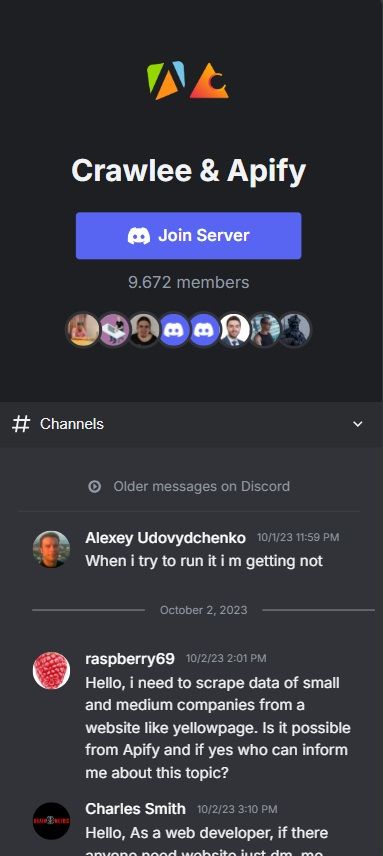
- Responsive: The website is responsive and looks great on all devices
- List messages, channels, roles, members, and more
- Join button: You can add a join button to your website to get more members
💡 Use Cases
- Share your server with the world
- Get more members
- Make content available outside of Discord
- Offer a landing page for your server
- Give a sneak peek of your server to potential members
🛠️ Configuration Options
| Parameter | Type | Description | Default |
|---|---|---|---|
| serverId | String | Discord server ID to generate website for | Required |
| authToken | String | Your Discord authorization token | Required |
| channelIds | Array | Optional list of specific channel IDs to include | All text channels |
| inviteCode | String | Discord invite code or full URL for the server | Optional |
| showMemberCount | Boolean | Whether to display the server's member count | true |
| activeUsersToShow | Number | Number of most active users to display. Set to 0 to hide | 8 |
| rolesToShow | Number | Number of top roles to display. Set to 0 to hide | 4 |
| messagesPerChannel | Number | Number of messages to fetch for each channel. | 100 |
The actor handles:
- Rate limiting and retries
- Batched message fetching (100 messages per request)
- Permission checking
- Error handling
📤 Output Format
The actor provides two main outputs:
- Static HTML File: A directly accessible HTML file containing your Discord server's website
- Dataset: JSON records containing:
- Server information (name, ID, member count)
- Direct link to the generated HTML file
- Channel and message data
The website URL will be available in:
- The actor run log
- The last row of the dataset output (in the "Overview" tab)
Open the URL to view the website and do a right mouse button click on the page. Click "Save as..." to save the website to your computer as index.html. You can also do view page source to see the HTML code and save it or copy it that way.
If you go to the Storage tab on Apify, and then click Key-value store, you will see the OUTPUT record. You can click on View to view the website or click on Download to download the HTML file.
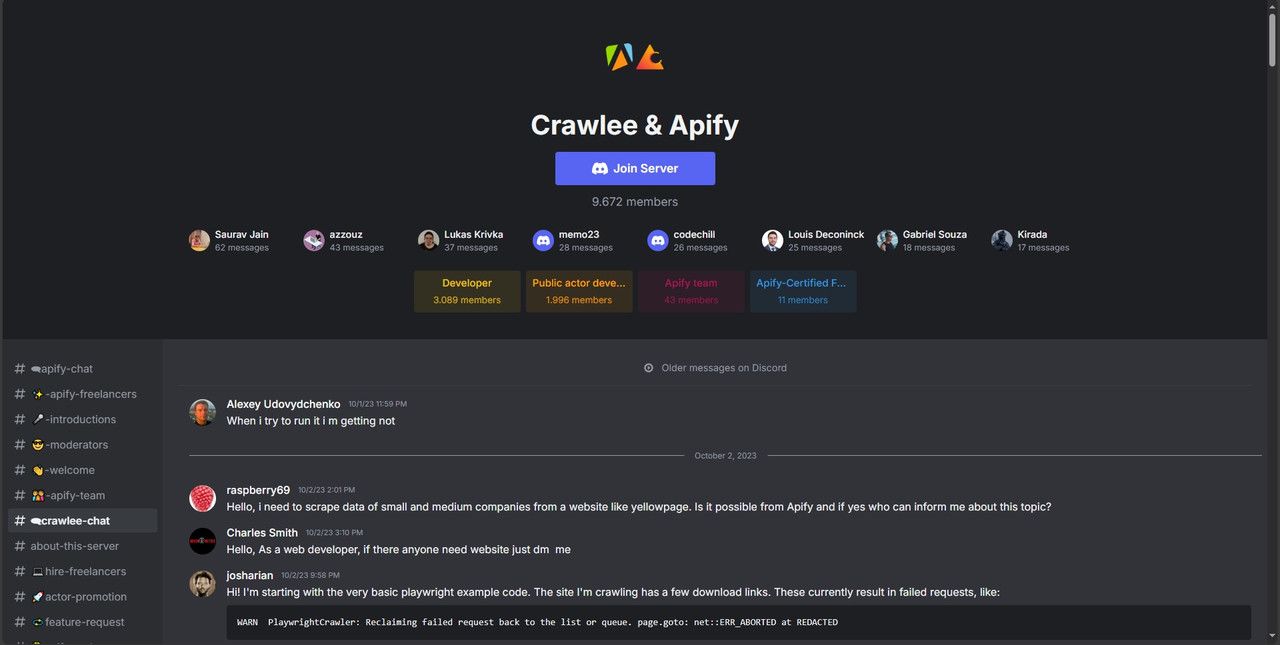
You can directly open the website URL in your browser to view your Discord server's website. The HTML file is self-contained and includes all necessary styles and scripts as it contains CSS and JavaScript code inside.
Desktop view
Mobile view
🔑 Obtaining Your Discord Authentication Token
In order for the scraper to work, you need to obtain your Discord authentication token. There are three possible ways to get it: through the Network section of the browser's Developer Tools, by pasting some JavaScript code in the browser console or through a browser extension. All three methods are described below.
The token looks something like this:
MTk4NjI0MzY5ODc1NDMyOTYw.HjKL9_.QWxZcVBnTmFsUHFaWXhDdkJyTnE2RHNqS3M0-8
Javascript Browser Console
- Go to Discord and make sure you are logged in: https://discord.com/channels/@me
- Open Developer Tools by one of these three methods:
- Press 'F12' on your keyboard
- Press 'Ctrl + Shift + I' on your keyboard (Cmd + Shift + I on Mac)
- Press '...' in the top right corner of the browser and select 'More tools' -> 'Developer tools'
- Go to the 'Console' tab
- Paste the following code:
webpackChunkdiscord_app.push([[Symbol()],{},e=>{t=Object.values(e.c).find(x=>x?.exports?.default?.getToken)?.exports?.default?.getToken();console.log(t);copy(t);}]);
- Press 'Enter'
- The token will be automatically copied to your clipboard and also printed in the console
Browser Extension Method
These are third party extensions that will get you the token. We are not affiliated with them.
Developer Tools: Network Tab
- Go to Discord and make sure you are logged in: https://discord.com/channels/@me
- Open Developer Tools by one of these three methods:
- Press 'F12' on your keyboard
- Press 'Ctrl + Shift + I' on your keyboard (Cmd + Shift + I on Mac)
- Press '...' in the top right corner of the browser and select 'More tools' -> 'Developer tools'
- Go to the 'Network' tab
- Click on the 'Fetch/XHR' tab
- Refresh the page
- Look for a request with the name '@me'
- Find the 'Authorization' header in the 'Request Headers' section
- Copy the token value associated with 'Authorization'
🚀 Getting Started
- Obtain your Discord authentication token
- Input the server ID and authentication token in the actor's input fields
- Run the actor and receive a fully generated website in the output tab
📈 Benefits
- Share your server with the world
- Get found by Google and other search engines
- Share a landing page of your Discord server
- Get more members
- Make your content available outside of Discord
⚙️ Workings
The actor uses the Discord API to fetch the data and generate the website. It respects Discord's rate limits and includes automatic retries for failed requests. All data is processed and returned in a clean, structured JSON format that preserves complete member information including profiles, roles, and connected accounts. It then generates a static HTML website file with this data.
🔒 Privacy & Compliance
- Only accesses servers you have permission to view
- Requires valid Discord authentication
- Respects Discord's rate limits
- Collected data is only accessible to you
Frequently Asked Questions
Is it legal to scrape job listings or public data?
Yes, if you're scraping publicly available data for personal or internal use. Always review Websute's Terms of Service before large-scale use or redistribution.
Do I need to code to use this scraper?
No. This is a no-code tool — just enter a job title, location, and run the scraper directly from your dashboard or Apify actor page.
What data does it extract?
It extracts job titles, companies, salaries (if available), descriptions, locations, and post dates. You can export all of it to Excel or JSON.
Can I scrape multiple pages or filter by location?
Yes, you can scrape multiple pages and refine by job title, location, keyword, or more depending on the input settings you use.
How do I get started?
You can use the Try Now button on this page to go to the scraper. You’ll be guided to input a search term and get structured results. No setup needed!