
Product Hunt Scraper
Scrape data on products and their team members from Product Hunt, which features new launches every day.
What does Product Hunt Scraper do?
Product Hunt Scraper allows you to extract valuable data about products and their team members from any launching day on Product Hunt: product name, short description, website URL, maker and hunter names, team member social media links, and more.
About Product Hunt
Product Hunt is a platform designed to keep you informed about the latest tech products and trends. It serves as a community where startups and creators can showcase their innovations to an engaged audience of tech enthusiasts, early adopters, and industry professionals. Each day, the platform features over 100 new products, accompanied by user reviews and discussions.
Product Data Fields
| Field Name | Type | Description |
|---|---|---|
| Launch Date | String | Date when the product was launched on Product Hunt |
| Url | String (URL) | URL of the product page on Product Hunt |
| Product Name | String | Name of the product |
| Short Description | String | Brief description of the product |
| Long Description | String | Detailed description of the product |
| Categories | List | Categories/topics the product belongs to |
| Website | String (URL) | Product's website URL |
| Upvotes | Int | Number of upvotes received on Product Hunt |
Team Members Data Fields
| Field Name | Type | Description |
|---|---|---|
| Team Member Name | String | Name of the team member |
| Team Member Identifier | String | Unique identifier (slug) of the team member |
| Team Member Link | String (URL) | Profile URL of the team member on Product Hunt |
| Team Member Role | String | Role of the team member (e.g., "Maker", "Hunter") |
| Team Member Title | String | Professional title of the team member |
| Team Member About | String | Bio/description of the team member |
| Team Member Links | List | External links associated with the team member |
| Team Member Interests | List | Topics/interests of the team member |
Why Scrape Product Hunt?
- Lead Generation: Identify startups for potential collaboration or investment.
- Market Research: Analyze trends and popular niches in the startup ecosystem.
- Startup Landscape Analysis: Gain insights into successful strategies and business models.
- Inspiration: Discover innovative ideas and technologies that can influence your project.
- User Feedback Collection: Monitor comments and reviews on new products to assess customer interest and satisfaction.
Example Input
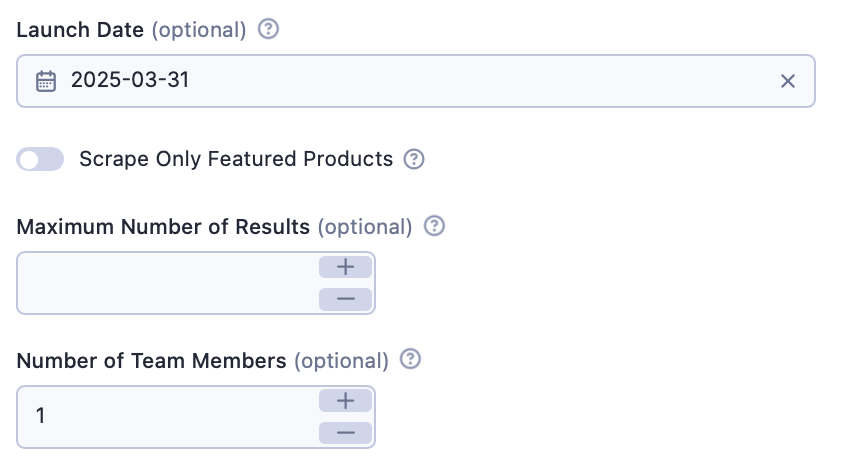
And here's the same, just in JSON:
1{
2  "date": "2025-03-31",
3  "numberOfTeamMembers": 1,
4  "scrapeFeatured": false
5}
Output Sample
The extracted results are organized into a dataset, which you can view in the Storage tab. The data is presented in a table format for easy viewing. Here's an example of some of the output from a previous input:
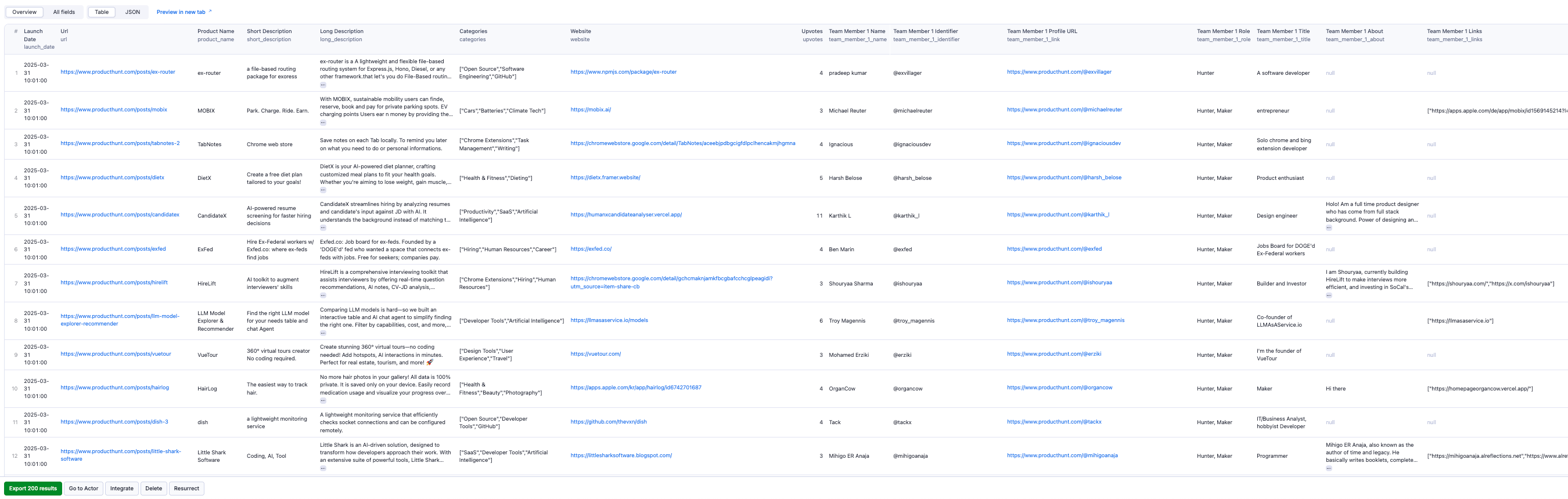
By clicking on the green Export button, you can download the dataset in XML, CSV, Excel, HTML, or JSON. See an example of a JSON file:
1{
2    "launch_date": "2025-03-31T00:01:00-07:00",
3    "url": "https://www.producthunt.com/posts/science-search",
4    "product_name": "Science Search",
5    "short_description": "AI-Powered Research in One Click",
6    "long_description": "Select any text or video and get an AI-curated research summary with the most relevant academic papers that best match your query.",
7    "categories": [
8      "Chrome Extensions",
9      "Productivity",
10      "Artificial Intelligence"
11    ],
12    "website": "https://www.findingwisdom.me/science-search",
13    "upvotes": 4,
14    "team_member_1_name": "Pham",
15    "team_member_1_identifier": "@phamorphosis",
16    "team_member_1_link": "https://www.producthunt.com/@phamorphosis",
17    "team_member_1_role": "Hunter, Maker",
18    "team_member_1_title": "Debug Life, Optimize Mind.",
19    "team_member_1_about": "I'm Pham.
I'm a specialized generalist, most times, I write and code.
My interests are technology, philosophy, biology and martial arts.",
20    "team_member_1_links": [
21      "https://www.findingwisdom.me/"
22    ],
23    "team_member_1_interests": [
24      "Design Tools",
25      "User Experience",
26      "Marketing",
27      "Developer Tools",
28      "Artificial Intelligence"
29    ]
30}
How to Use Product Hunt Scraper
Product Hunt Scraper is user-friendly and requires no prior technical expertise. Follow these simple steps to extract data from Product Hunt:
- Run the Scraper: Click the Start button to automatically fetch the latest top Product Hunt listings.
- Export Your Data: Download your dataset in Excel, CSV, JSON, HTML, or access it via the API.
Features
- Launch Date: Select a specific date to get data from the Product Hunt Archive.
- Featured Products: Option to scrape only products from the Featured category.
- Customizable Results: Set your desired limit for the number of products to scrape.
- Team Members: Choose how many team members to scrape per product (0-2).
Tips
- Resource Usage: Note that scraping team member data increases run time and resource usage. The more team members you select, the more resources will be needed.
- Optimal Timing: For best results, run or schedule the scraper at 23:00 PST, as Product Hunt operates on PST timezone and the new day starts at 00:01 PST.
Integrations and Product Hunt Scraper
Product Hunt Scraper can be connected with almost any cloud service or web app thanks to integrations on the Apify platform. You can integrate with Make, Zapier, Slack, Airbyte, GitHub, Google Sheets, Google Drive, and more.
Your Feedback
We're always working on improving the performance of our Actors. If you've got any technical feedback for Product Hunt Scraper or simply found a bug, please create an issue on the actor's Issues tab in Apify Console.
Frequently Asked Questions
Is it legal to scrape job listings or public data?
Yes, if you're scraping publicly available data for personal or internal use. Always review Websute's Terms of Service before large-scale use or redistribution.
Do I need to code to use this scraper?
No. This is a no-code tool — just enter a job title, location, and run the scraper directly from your dashboard or Apify actor page.
What data does it extract?
It extracts job titles, companies, salaries (if available), descriptions, locations, and post dates. You can export all of it to Excel or JSON.
Can I scrape multiple pages or filter by location?
Yes, you can scrape multiple pages and refine by job title, location, keyword, or more depending on the input settings you use.
How do I get started?
You can use the Try Now button on this page to go to the scraper. You’ll be guided to input a search term and get structured results. No setup needed!